The Hidden Frustration of Creating AI Art
I remember the first time I tried making AI art. I had this amazing sci-fi city in my head, but after typing my prompt, I got a blurry, confusing mess that looked nothing like my idea. I felt so silly, wondering why everyone else was making masterpieces while I was just wasting my time.
You have likely felt the sting of disappointment when staring at a blank prompt box. You type in a detailed description, hit enter, and wait with genuine excitement. Yet, the image that appears looks nothing like the masterpiece you imagined in your mind. It is frustrating to feel like your creative intent is getting lost in translation between your brain and the machine. This gap between what you want and what you get is a common struggle for everyone.
Many people fall into a trap because they rely on guesswork rather than understanding how these tools actually function. Here is why your experience might feel like a constant hit-or-miss:
- Reliance on Vague Instructions: Most users provide short, weak descriptions that give the AI too much creative freedom.
- Ignoring Technical Parameters: People often forget that AI interprets order, style, and lighting differently than a human artist.
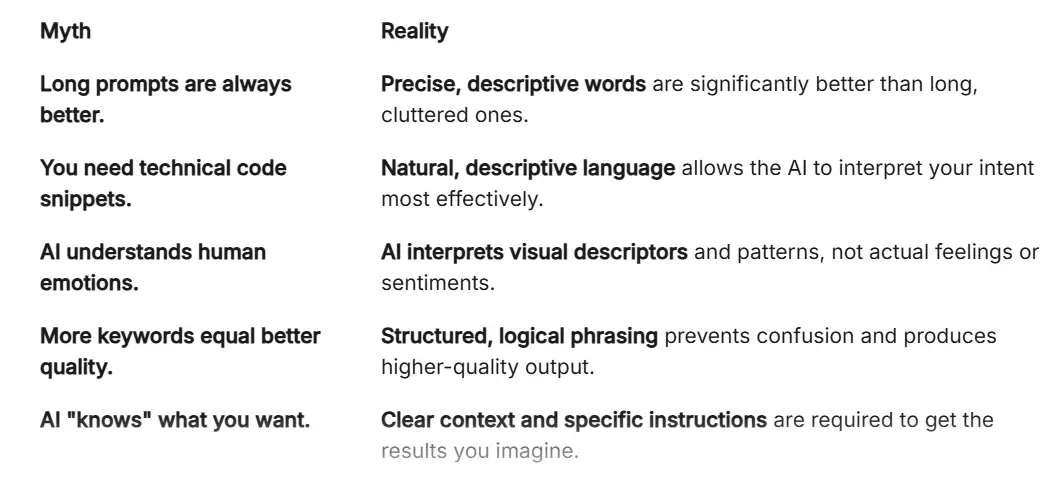
- The Echo Chamber of Misinformation: There is a lot of bad advice online claiming you need long, complex "magic codes" to get a good result.
- Over-complication: Many beginners try to pack every single keyword into one sentence, which only confuses the model's focus.
This cycle of trial and error is not just annoying; it takes a toll on your creative spirit.
- Loss of Confidence: You start to believe that you are not "good" at AI, when really, the tool just needs better instructions.
- Burnout: Spending hours generating dozens of images only to delete them all is exhausting and demotivating.
- Mental Fatigue: The constant need to pivot and change your prompt leads to decision paralysis.
- Waste of Time: You end up spending more time managing software errors than actually producing work you enjoy.
At its core, this struggle happens because we treat AI like a human instead of a probability engine. We expect the AI to "read our minds" instead of providing the specific context it needs to build an image. When you treat the AI as a partner that requires logical steps, the results shift from random noise to intentional art.
You do not need to be a computer scientist to master this. You simply need to understand the basic mechanics of how text becomes pixels. Once you view the prompt as a set of instructions for a digital architect, your frustration will transform into creative power.
If you are a visual learner, watch this quick video below to see exactly how these prompt secrets work in real time, and then keep reading to learn the simple formula I use to get perfect images every single time.
Decoding the Engine: How AI Sees Your Words
To get great images, you must understand that the AI does not "see" your prompt the way you do. It does not understand beauty, meaning, or emotion. Instead, it relies on statistical relationships learned from billions of image-text pairs. When you type "A cat," the AI looks at its massive internal map and says, "Based on my data, this is what a cat usually looks like."
Step 1: The Principle of Contextual Anchoring
The AI starts building an image by identifying your primary subject first. If you type "A golden retriever sitting in a park," the system prioritizes "Golden Retriever." It anchors the entire generation process around this core concept.
- The Pro Tip: Place your most important subject at the very beginning of your prompt.
- Why it works: The AI devotes the most "memory" and focus to the first few words of your request.
- Example: "A vintage pocket watch on a wooden table" will yield much more consistent results than "On a wooden table, there is a vintage pocket watch."
Step 2: The Art of Adding Descriptive Modifiers
Once the subject is anchored, the AI looks for modifiers to define the style and mood. These are your adjectives and stylistic nouns. If you just ask for a "House," the AI will pick a default style. If you ask for a "Victorian mansion at sunset, oil painting style," you have given it specific boundaries.
Think of modifiers as the camera settings for a photographer. You are telling the AI the "lighting," the "angle," and the "texture" of the image.
Step 3: Controlling the Compositional Balance
This is where many users fail. They forget that the AI needs to know how things relate to each other in space. Do not just list items. Describe the relationship between them.
Instead of saying "Dog, tree, sun," try saying "A dog sitting under a large oak tree during a golden hour sunset." This creates a scene. The AI now knows the dog is positioned relative to the tree, and the light is coming from the sun. This relational structure is the secret ingredient for professional-looking AI generation.
For a long time, my biggest mistake was just throwing a bunch of random words together and hoping the machine would figure it out. Once I realized I needed to tell the AI exactly where to put things, like a director setting up a movie scene, my images finally started looking exactly how I wanted.
Expert Insight: The Layering Method
Think of your prompt in three distinct layers:
- The Subject: What is the main focus?
- The Environment: Where is it?
- The Style: How should it look?
If you build your prompt in this specific order every time, you will immediately notice a higher success rate. For instance, "A futuristic astronaut (Subject) standing on a red planet (Environment) in the style of 1970s sci-fi concept art (Style)." This flow is logical, easy for the AI to parse, and ensures you get exactly what you want.
Stop treating prompts like a random list of words. Start treating them like a short, descriptive story. When you give the AI a clear subject, a setting, and a style, you take full control of the output. The technology is not as complex as it seems once you learn to speak its language. You have the power to create professional visuals today simply by being more intentional with your words. Keep experimenting with this structure, and watch how your digital creations change for the better.
Mastering Nuanced Control Over Your AI Creations
Once you understand the basics of prompt architecture, it is time to move beyond simple descriptions. To achieve professional results, you must learn to "weight" your prompts. This means giving specific emphasis to certain elements over others within the software.
The Power of Token Weighting and Emphasis
Most advanced AI image tools allow you to assign importance to specific words. When you place a word in parentheses or add a multiplier, the machine pays closer attention to that part of your request. This helps when you want a specific detail, like a "glowing blue neon light," to dominate the scene.
Think of this like a conductor leading an orchestra. You decide which instruments—or in this case, visual elements—should be louder. By emphasizing key subjects, you prevent the AI from defaulting to average, blurry, or generic outcomes.
- Adjusting Emphasis: Use brackets to signal importance. For instance, (detailed facial features) tells the engine to prioritize that specific area.
- The Weighting Effect: If the AI ignores your request for "vintage clothing," add weight to that phrase. You are effectively guiding the software's internal math toward the result you actually want.
Achieving Visual Consistency Over Time
One of the biggest hurdles creators face is mastering AI character consistency across different images. If you create a hero character but it changes its appearance in every new generation, your work lacks professional cohesion.
To fix this, you need to use consistent style seeds and descriptive anchor tags. Describe your character’s features with extreme precision, such as "sharp jawline, emerald eyes, messy blonde hair."
If you find this overwhelming, it helps to use the perfect text prompt formula that breaks down every visual variable. By keeping a "prompt library," you save your most successful descriptions to reuse them later. This builds a brand identity for your digital art.
Why Iteration Beats Perfection
Never expect a perfect image on your first attempt. Even expert prompt engineers go through ten or twenty variations before finding the one that fits their vision.
Treat the first attempt as a draft. If the light is too dim, add "bright studio lighting" to your next prompt. If the angle is too close, change it to "wide shot, cinematic view."
By treating the process like a real-life photography shoot, you remain calm and creative. The AI is a tool, and you are the director. Directing is a skill that improves with every single click of the "generate" button.

Hidden Traps That Ruin Your AI Output
Even with a good prompt, it is easy to stumble into common traps. These pitfalls often lead to distorted figures, muddy colors, or nonsensical backgrounds. Being aware of these will save you hours of wasted effort.
The Negative Prompt Trap
Many beginners forget to use Negative Prompts. These are instructions telling the AI what not to include, such as "blurry, low quality, distorted hands, or extra fingers." Without these safeguards, the AI often introduces unwanted artifacts that ruin the final piece.
Ignoring Aspect Ratios
If you ignore the dimensions, the AI will default to a square. This is often the wrong choice for professional projects. You must explicitly request "16:9" for cinematic looks or "9:16" for mobile-friendly content. Aspect ratio changes the composition entirely, forcing the AI to reorganize the scene to fit the frame.
Overloading the System
Do not cram too many conflicting ideas into one request. If you ask for a "futuristic city in the style of a medieval painting," you are giving the engine competing instructions. This creates visual confusion. Pick a primary style and layer minor details on top of that instead.
Relying on Guesswork
As noted by experts at Forbes, understanding the underlying logic of AI is better than copying random strings of words found on the internet. Guessing leads to inconsistency. Learning the why behind the generation process gives you long-term mastery.
Ignoring Lighting Cues
Lighting defines the mood of your image. Many users ignore this and let the AI pick a default. By explicitly stating "dramatic shadows," "soft morning light," or "high-key studio lighting," you take control of the image's emotional impact.
Your Path Forward as a Digital Creator
You are now equipped with more than just basic knowledge. You have a structural understanding of how your words shape the digital canvas. Every prompt you write is a chance to refine your unique creative voice.
Action Plan for Tomorrow
- Start Small: Choose one specific style, such as "oil painting" or "photorealistic portrait," and generate five variations.
- Document Success: Keep a simple document of the prompts that worked well.
- Analyze Failures: When an image looks bad, identify exactly which word might have caused the confusion.
This process is a marathon, not a sprint. If you feel frustrated, step away and come back with a fresh perspective. You are building a new skill set that is changing the world of digital design.
Trust the process, keep your prompts logical, and remember that you are the architect of your own visuals. The machine provides the paint, but you provide the vision. Go ahead and start creating your first masterpiece today .
When I look back at my first awful AI images, I just have to laugh because getting better really only took a little patience and a simple shift in my thinking. I promise that if you stick with it and use these simple steps today, you will be amazed at the beautiful art you can build.
Disclaimer: This content is for educational and informational purposes only. The information provided is based on current trends in artificial intelligence and does not guarantee specific results. Always review the terms of service of the AI platforms you use to ensure compliance with their usage policies.
***THANK YOU***