
The Hidden Struggle Behind Your Glowing Screen
A couple of years ago, I spent a huge chunk of my savings on a brand-new phone, expecting it to be perfect. But within a week, my eyes felt totally dry, and I was getting awful headaches every single night just from reading in the dark. I honestly thought my vision was going bad, until I finally realized my shiny new screen was actually the root of my problem.
You pick up your new phone, step out into the bright morning sun, and suddenly, you cannot read a single text message. The screen looks completely washed out. Your eyes start to hurt as you squint, trying to decipher the dark shadows on the glass.
This is a daily reality for millions of smartphone users who spend hard-earned money on devices, only to end up with constant eye strain and terrible outdoor visibility. We rely on these glowing rectangles for work, communication, and entertainment. Yet, when the screen fails to perform in real-life conditions, it creates an incredibly frustrating and exhausting experience.
Most people try to fix this by searching for better phones, but they quickly fall into a trap of confusing marketing terms and terrible advice. Here is why finding the right information is so difficult today:
- Confusing Marketing Jargon: Brands throw around fancy acronyms like AMOLED, Super Retina, and LTPO, leaving regular buyers completely lost and overwhelmed.
- Misleading Brightness Claims: Companies advertise massive brightness numbers that only work for a few seconds in a tiny spot, hiding the real daily performance.
- Biased Sales Pitches: Store clerks often push the most expensive models without explaining if the screen technology actually fits your specific vision needs.
- Hidden Technical Flaws: Issues like screen flickering (PWM dimming) are rarely mentioned in standard reviews, causing severe headaches for sensitive users.
This constant bombardment of bad information does more than just drain your wallet. It takes a serious toll on your mental peace and your confidence as a consumer.
- Fear of Wasting Money: You constantly worry that one wrong drop will shatter a display that costs half your monthly salary to replace.
- Anxiety Over Screen Damage: The lingering fear of "burn-in" makes you nervous about keeping your favorite apps open for too long.
- Loss of Confidence: When your new phone gives you a headache, you start blaming your own eyesight instead of the poorly designed display panel.
- Decision Paralysis: The fear of making the wrong choice keeps you stuck with an old, broken phone far longer than you should be.
Breaking Down the Glass: How Your Screen Actually Works
To stop feeling overwhelmed by complicated tech specs, we need to look at what is actually happening underneath the glass of your phone. Your screen is not just a single piece of glowing plastic. It is a highly complex sandwich of microscopic technologies working together perfectly.
Understanding these hidden layers will completely change how you look at your device. It will also help you make much smarter choices next time you need a new phone. Let us walk through the internal mechanics of a modern screen.
The Foundation: The Substrate Layer
Everything starts at the very bottom, on a layer called the substrate. Think of the substrate as the strong foundation of a house. Without a good foundation, the entire display would simply fall apart.
In older phones, this foundation was made of rigid glass. This made the screens heavy and very easy to crack when dropped. However, modern displays have shifted to using highly advanced, flexible plastics.
This plastic foundation is what allows phone makers to fold screens in half or curve them around the edges of the device. It also acts as a shock absorber. When you accidentally drop your phone on a hard floor, a plastic substrate bends slightly, saving the expensive parts above it from shattering instantly.
The Color Factories: Millions of Tiny Pixels
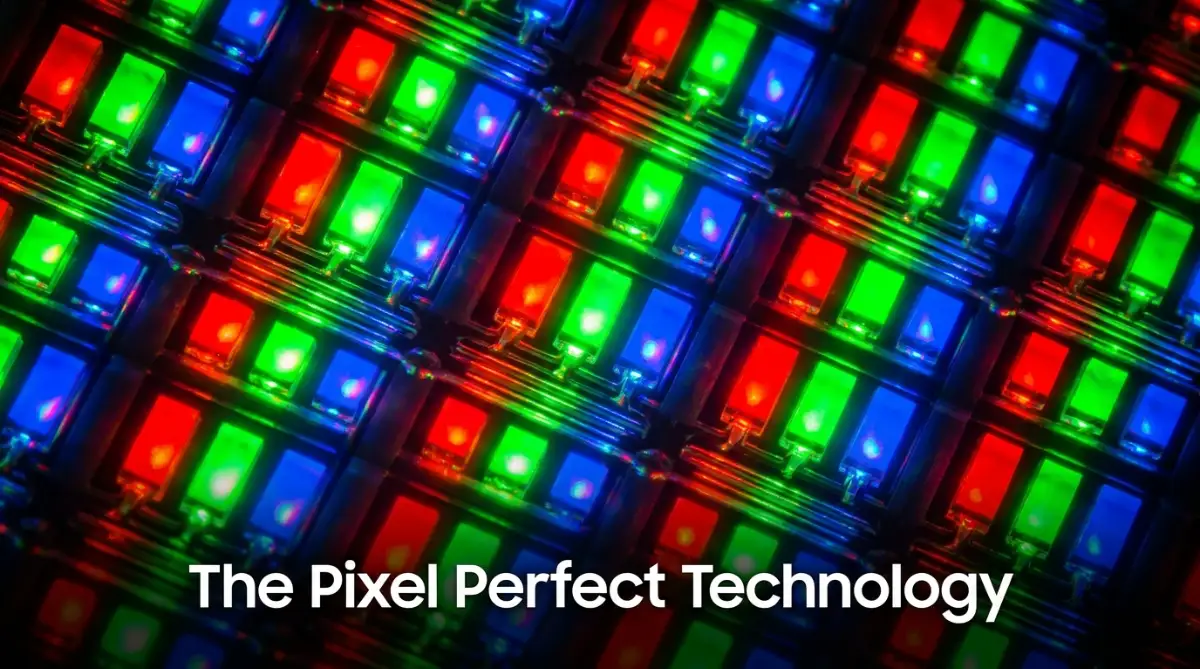
Sitting right above the foundation is the real magic of your display. This layer contains millions of tiny dots called pixels. You can think of these pixels as microscopic color factories that paint the images you see.
Each single pixel is broken down into three even smaller parts known as sub-pixels. These sub-pixels come in red, green, and blue. By mixing these three basic colors at different brightness levels, your phone can create any color the human eye can see.
For example, when you look at a beautiful white cloud in a photo on your screen, the red, green, and blue sub-pixels are all shining at their absolute maximum brightness. When you look at a dark shadow, they dim down or turn off completely.
Myth vs Reality: The Screen Resolution Trap
The Myth: A higher resolution screen always means you get a better, sharper phone.
The Reality: After a certain point, the human eye cannot see any extra detail. A 4K screen on a small phone drains your battery incredibly fast, but looks almost identical to a standard high-definition screen from a normal viewing distance. Do not let big resolution numbers force you into buying a more expensive device.
The Touch Sensor: Reading Your Fingertips
A screen that only shows pictures is completely useless on a smartphone. We need to interact with it. That is where the capacitive touch layer comes into play.
This invisible layer sits just underneath the top glass. It is made of a microscopic grid of electrical wires that are so thin you cannot see them. This grid holds a very tiny, safe electrical charge across the whole screen.
The human body naturally conducts electricity. When your finger taps the glass, it absorbs a tiny bit of that electrical charge from the grid. The phone's processor instantly calculates exactly where that electricity went missing, and registers your touch.
This is exactly why you cannot use your phone while wearing thick winter gloves. The cloth blocks your body's natural electricity from reaching the sensor grid.
The Guardian Layer: The Cover Glass
Finally, we reach the top layer, which is the part you actually touch every single day. The cover glass acts as a bodyguard for the delicate electronics underneath.
Standard window glass would scratch and shatter in your pocket within a day. Therefore, tech companies use special chemical baths to force large atoms into the glass structure. This chemical process creates immense tension, making the glass incredibly tough and resistant to deep scratches from keys or coins.
This glass also features an oleophobic coating. This is a special chemical treatment that repels the natural oils from your skin. It is the reason why your fingerprints easily wipe off your screen with a soft cloth, keeping the display looking clean and bright.
The Core Technologies: LCD vs OLED Explained
Now that you know the basic layers, we need to talk about the two main ways phones actually generate light. Almost every phone on the market uses either LCD or OLED technology. The difference between these two completely changes how your battery drains and how your photos look.
How LCD Screens Push Light
LCD stands for Liquid Crystal Display. If you own a budget-friendly phone, you are likely looking at an LCD screen right now.
An LCD screen does not create its own light. Instead, it relies on a bright white panel sitting at the very back of the phone, called the backlight. Think of this backlight as a bright flashlight shining constantly.
In front of this flashlight are thousands of tiny, microscopic shutters made of liquid crystals. When the phone wants to show a specific color, it uses electricity to twist these tiny shutters open or closed. The white light pushes through the open shutters, passes through color filters, and reaches your eyes.
The Problem with Liquid Crystals
The biggest issue with LCD technology is dealing with the color black. Because that bright white backlight is always shining, the tiny shutters try to close completely to block the light and create darkness.
However, they are never perfectly tight. A tiny bit of white light always leaks through the cracks. This is why when you watch a dark movie on an LCD screen at night, the black areas look slightly gray or washed out.
Pro Tip: Testing Screen Contrast
If you want to know how good a phone screen really is, open a pure black photo while standing in a dark room. If the screen emits a faint gray glow, it is an LCD with light bleed. If the screen looks completely dead and invisible in the dark, you have a high-quality OLED display.
Why OLED Screens Control Darkness
OLED stands for Organic Light Emitting Diode. This technology takes a completely different approach to lighting up your phone.
In an OLED screen, there is no giant backlight acting like a flashlight. Instead, every single microscopic pixel produces its own individual light. You can imagine a giant sports stadium where every single seat has its own independent lamp.
When an OLED screen needs to show the color black, it does something amazing. It completely cuts the power to those specific pixels. The pixels physically turn off.
The Amazing Benefits of Independent Pixels
Because the pixels turn off entirely, OLED screens produce perfect, deep blacks. This creates incredible contrast, making colors look incredibly vibrant and rich compared to older screens.
This also saves a massive amount of battery life if you use "Dark Mode" on your phone. When the background of your app is black, thousands of tiny lights on your screen are literally shut off, saving electricity. This is a massive advantage for heavy phone users who hate carrying a charger everywhere.
A Quick Comparison Table
If you are still a little confused about how LCD and OLED actually look in real life, check out this awesome visual breakdown below. It shows both screens side-by-side in the dark, making it super easy to see which display technology you really want!
The Illusion of Motion: Understanding Refresh Rates
You have probably heard phone companies boasting about "120Hz" or "Smooth Displays". This refers to the screen's refresh rate, which is heavily tied to the architecture of the display panel.
Your phone screen does not actually show moving video. Instead, it works exactly like an old-fashioned flipbook. It flashes a series of still images so incredibly fast that your brain gets tricked into seeing smooth motion.
The refresh rate simply measures how many times the screen can draw a new picture in one single second. A standard screen draws 60 pictures per second, known as 60Hz.
What Happens Inside During a Swipe
When you quickly swipe up to scroll through a website, a 60Hz screen might look slightly blurry. Your eyes can subconsciously notice the tiny gaps between the pictures.
Modern displays now push that number to 90 or even 120 pictures per second. By doubling the amount of frames, the gaps between images become practically invisible. This makes scrolling feel incredibly smooth, almost as if you are pushing real paper under the glass.
The Battery Drain Dilemma
However, drawing 120 pictures every second requires the processor to work twice as hard. This creates a huge problem for your daily battery life.
To solve this, engineers developed a brilliant piece of display architecture called LTPO technology. An LTPO screen is smart enough to change its speed on the fly. If you are playing a fast racing game, it speeds up to 120Hz for perfect smoothness.
But if you stop touching the screen to read a static paragraph of text, the screen drops down to 1Hz. It only draws one picture per second because nothing is moving. This clever trick gives you the beautifully smooth experience while saving your battery from draining before lunch.
Mastering Your Screen: Pro Strategies for Peak Performance
Most of us buy a new phone, turn it on, and never even look at the display settings again. That is a huge missed opportunity. You are holding a highly advanced piece of engineering in your hand.
To truly get the best experience, you need to understand how to manage this hardware. Let me show you exactly how to unlock its full potential while keeping the internal components healthy. You do not need a degree in computer science to do this. You just need to follow a few smart, practical steps.
The Heat and Brightness Trap
Your smartphone display hates extreme heat. When you combine intense sunlight with maximum screen brightness, you are pushing the internal architecture to its absolute limit.
Imagine running a car engine at top speed for hours without letting it cool down. Eventually, the parts will start to break. The exact same thing happens to the tiny organic pixels inside an OLED screen.
If you frequently use your phone for GPS navigation while it sits on a hot car dashboard, you are risking permanent damage. The organic materials inside the pixels degrade much faster when exposed to high temperatures. Always try to keep your phone in the shade or near an air conditioning vent when driving.
Calibrating Your Colors for Real Life
Have you ever noticed that photos on your new phone look almost glowing and overly colorful? Manufacturers intentionally configure screens to a "Vivid" or "Saturated" mode right out of the box.
They do this because super bright, neon-like colors catch your eye easily inside a brightly lit electronics store. However, using this vivid setting in your daily life can severely strain your eyes. It also makes your photos look unnatural when you print them or send them to other devices.
I highly recommend going into your phone settings and switching the color profile to "Natural" or "Standard". It might look slightly dull for the first hour. But soon, your eyes will adjust, and you will start seeing colors exactly as they appear in the real world.
Managing Blue Light for Better Sleep
Modern displays emit a massive amount of artificial blue light. During the daytime, this is perfectly fine. Blue light mimics the natural sky and keeps our brains awake and alert.
The problem begins when the sun goes down. Staring at a bright screen in bed tricks your brain into thinking it is still daytime. This stops your body from producing sleep hormones, leaving you tossing and turning all night.
You must set up an automatic blue-light filter schedule. Almost every phone has an "Eye Comfort" or "Night Shift" feature. Set it to turn on automatically at sunset. The screen will turn slightly yellow, which feels much softer on your eyes.
Chronic eye strain from poor screen habits can sometimes lead to severe headaches or unexpected doctor visits. If you ever find yourself needing professional help for continuous vision issues, having a solid backup plan is incredibly helpful. You can easily review how comprehensive health insurance explained works to ensure your basic checkups and eye care are properly covered.
The Magic of Smart Refresh Rates
Earlier, we talked about how smooth screens drain your battery. You can actually take control of this feature to get the best of both worlds.
If you are going on a long trip and forgot your charger, jump into your display settings. Change your screen from "Adaptive" or "High" refresh rate down to the standard "60Hz". Your phone might feel slightly less smooth when swiping, but you will instantly gain hours of extra battery life.
Learning to balance performance with battery saving is the mark of a smart user. Understanding how smartphone displays impact battery life gives you the power to choose what matters most to you in any given situation.

Everyday Habits That Are Quietly Ruining Your Display
We do things every single day that slowly degrade our expensive smartphone screens. Sometimes, the damage is completely invisible until it is far too late to fix it.
You might think you are taking great care of your device, but certain popular habits are actually doing more harm than good. Let us look at the real-life mistakes you need to stop making today.
The Screen Protector Liquid Disaster
Many people buy cheap, liquid-glue glass screen protectors online to save money. These kits require you to pour liquid adhesive onto the screen before curing it with a tiny UV light.
This is an incredibly dangerous process for modern smartphones. The liquid glue can easily seep into the tiny gaps around your speaker grill or the side buttons. Once it gets inside the phone and hardens, it can permanently destroy the delicate display cables underneath the glass.
Always stick to high-quality, dry-adhesive screen protectors. They might cost a little more upfront, but they will never destroy your phone from the inside out.
Ignoring the Flickering Light Problem
Many OLED screens use a specific trick to lower their brightness in dark rooms. Instead of actually dimming the tiny lights, the screen quickly turns itself completely off and on hundreds of times a second.
This is known as PWM dimming. Your eyes cannot consciously see the flickering, but your brain definitely feels it. For sensitive people, this invisible flashing causes intense headaches and severe eye fatigue after just a few minutes of reading in the dark.
If your phone gives you a headache at night, try keeping the brightness slightly higher and using a dark gray background instead of pure black. Constant hardware-induced migraines can cause serious health anxieties. Dealing with sudden medical concerns becomes much easier when you understand the complete roadmap to getting your medical claims approved, ensuring you are never caught off guard financially.
The Danger of Static Images
If you have an OLED screen, you need to respect the organic pixels. They have a limited lifespan. If you force them to show the exact same image for hours on end, they will permanently degrade.
This is known as "burn-in". Imagine falling asleep while a TikTok live stream is running on maximum brightness. The static icons on the edge of the screen will literally burn a permanent ghost image into the display.
You will be forced to see those faint icons every time you open a white webpage. Reading up on preventing permanent screen burn-in is a smart way to protect your investment and save hundreds of dollars in repair costs. Always set your phone to automatically lock the screen after one minute of inactivity.
Cleaning with Harsh Household Chemicals
We all want a clean phone, especially after returning from a crowded public place. However, grabbing a bottle of household window cleaner or harsh rubbing alcohol is a terrible idea.
Your smartphone glass has a delicate chemical layer called an oleophobic coating. This invisible shield repels your natural finger oils and makes swiping feel incredibly smooth. Harsh household chemicals strip this coating away instantly.
Once the coating is gone, your screen becomes a sticky fingerprint magnet. Swiping through menus will feel rough and annoying. Always clean your display with a slightly damp microfiber cloth. If you must disinfect it, use wipes specifically designed for electronics.
I actually learned this the hard way when I tried to clean my phone with a heavy-duty household glass spray, completely destroying that smooth, oil-resistant layer on the glass. Now, I just keep a tiny, dry microfiber cloth in my bag, and it makes my screen feel completely brand new without causing any hidden damage.
Your Blueprint for a Better Viewing Experience
We have covered everything from the microscopic sub-pixels hiding inside your phone to the daily habits that keep them functioning perfectly. You now understand exactly why your screen behaves the way it does.
You no longer have to rely on confusing sales pitches or flashy marketing terms. You know exactly what makes a display truly good, and more importantly, how to protect it. It is time to put this knowledge into action.
An Action Plan for Tonight
You can immediately improve your smartphone experience without spending a single dime. Start by doing these three simple things right now:
- Turn on Auto-Brightness: Let the phone decide how much light you need. This saves battery and protects your screen from overheating.
- Schedule Your Eye Comfort Shield: Set your blue light filter to activate automatically at 8:00 PM. Your eyes and your sleep schedule will thank you.
- Wipe Down with Microfiber: Find a clean, soft cloth and gently wipe away the oils on your screen. Notice how much smoother typing feels without dirt blocking the touch sensors.
Making Smarter Choices Moving Forward
The next time you walk into a store to buy a phone, you will view the devices completely differently. You will instantly recognize which phones have deep OLED blacks and which ones have washed-out LCD screens.
Protecting your expensive technology requires the same careful planning as protecting your overall lifestyle. Whether you are balancing your budget for a new premium device or figuring out your personal expenses, taking time to master your health policy helps you maintain total peace of mind in every aspect of your life.
A Final Word from the Expert
Your smartphone is your daily window to the digital world. You look through this window to talk to loved ones, capture memories, and learn new things.
Treat this piece of technology with care. Adjust the settings to fit your personal comfort, avoid extreme heat, and never use harsh chemicals on the glass. A well-maintained display will keep your device looking brand new for years to come. Start applying these small changes today, and enjoy a much cleaner, brighter, and healthier digital experience.
Taking control of your phone settings truly makes a world of difference for your daily comfort and long-term eye health. You do not need to be a tech genius to do this, so grab your phone right now and turn on that automatic blue light filter. I promise you will feel much more relaxed when you look at your screen tonight!
Disclaimer: This article is strictly for informational and educational purposes. The technology concepts and hardware maintenance tips discussed are based on general industry standards. Always refer to your official smartphone manufacturer guidelines for specific device care and repair instructions. For any health-related issues like chronic eye strain, please consult a certified medical professional.
THANK YOU